Databricks
Supported Databricks Runtime versions: 12.2 – 17.3
❗ Note: This instrumentation covers Databricks clusters. For Serverless compute, use the Databricks Serverless agent instead — no installation required on your side.
Setup
TL;DR
Five steps to get Definity running on a cluster. The init script will:
- Automatically detect your Spark and Scala versions
- Download the appropriate Definity Spark agent
- Configure the Definity plugin with default settings
- If configuration fails, the cluster will continue to start normally
1. Generate an agent token
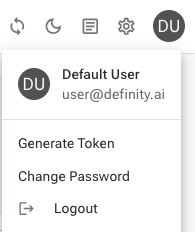
In the Definity app, click your user avatar (top right) and select Generate Token.
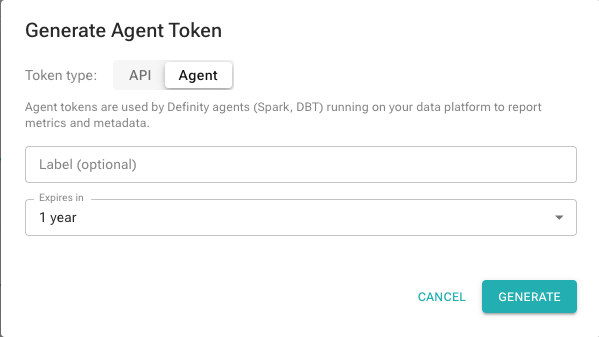
Select the Agent token type, optionally add a label, and click Generate. Copy the token.
2. Store the token as a Databricks secret
databricks secrets create-scope definity.ai
databricks secrets put-secret --json '{"scope": "definity.ai", "key": "agent.token", "string_value": "<YOUR_AGENT_TOKEN>"}'
databricks secrets put-acl definity.ai users READ
Definity reads the token from scope definity.ai, key agent.token by default. To use a different scope or key, update the commands above and set spark.definity.databricks.tokenSecret.scope / spark.definity.databricks.tokenSecret.key in the init script (see step 3).
For a quick test without setting up a secret, set DEFINITY_AGENT_TOKEN=<YOUR_TOKEN> directly in the cluster environment variables under Cluster configuration → Advanced options → Spark → Environment Variables, then skip to step 3.
3. Save the init script
Save the script below as databricks_definity_init.sh. Upload it to a Volume, cloud storage, or workspace files.
databricks_definity_init.sh
#!/bin/bash

# ============================================================================
# Definity Agent Configuration for Databricks
# Tested Databricks Runtimes: 12.2 LTS - 17.3 LTS (Spark 3.3 - 4.0)
# ============================================================================
# This script automatically detects your Spark and Scala versions and
# installs the appropriate Definity Spark Agent.
#
# The agent token is read automatically from the Databricks workspace secret.
# Default scope: definity.ai, key: agent.token. Override via spark.definity.databricks.tokenSecret.scope/key.
#
# If installation fails, the cluster will start normally without the agent.
# ============================================================================

# ============================================================================
# CONFIGURATION
# ============================================================================

# Base path to the agent JARs.
# The script auto-detects Spark/Scala and appends the JAR filename, e.g.:
#   {base_path}/definity-spark-agent-3.5_2.12-0.80.2.jar
#
# For production use, upload the agent JAR to your own artifact repository
# and update this path. See "Hosting the agent JAR yourself" below.
#   Volumes    : "/Volumes/<catalog>/<schema>/<volume>"
#   HTTP/HTTPS : "https://your-artifactory.company.com/repository/libs-release"
#   S3         : "s3://your-bucket/definity"
ARTIFACT_BASE_PATH="https://user:[email protected]/java"

# Version of the Definity agent (e.g. "0.80.2")
DEFINITY_AGENT_VERSION="latest"

# Agent token — optional. Definity reads it automatically from the workspace secret
# (scope: definity.ai, key: agent.token). Uncomment to override on this cluster only.
# DEFINITY_AGENT_TOKEN="<YOUR_AGENT_TOKEN>"

# ============================================================================
# AUTO-DETECTION AND INSTALLATION
# ============================================================================

JAR_DIR="/databricks/jars"
mkdir -p "$JAR_DIR"

FULL_SPARK_VERSION=$(cat /databricks/spark/VERSION)
SPARK_VERSION=$(echo "$FULL_SPARK_VERSION" | grep -oE '^[0-9]+\.[0-9]+')
echo "Detected Spark version: $SPARK_VERSION"

if [ -z "$SPARK_VERSION" ]; then
    echo "Spark major.minor version is empty or not found. Will not proceed to install definity agent"
    exit 0
fi

DBR_VERSION=$(cat /databricks/IMAGE_KEY)
SCALA_VERSION=$(echo "$DBR_VERSION" | grep -oE 'scala([0-9]+\.[0-9]+)' | sed 's/scala//')
echo "Detected Scala version: $SCALA_VERSION"

if [ -z "$SCALA_VERSION" ]; then
    echo "Scala version is empty or not found. Will not proceed to install definity agent"
    exit 0
fi

SPARK_AGENT_VERSION="${SPARK_VERSION}_${SCALA_VERSION}"
FULL_AGENT_VERSION="${SPARK_AGENT_VERSION}-${DEFINITY_AGENT_VERSION}"

AGENT_JAR_NAME="definity-spark-agent-${FULL_AGENT_VERSION}.jar"
AGENT_JAR_SRC="${ARTIFACT_BASE_PATH}/${AGENT_JAR_NAME}"
echo "Fetching Definity Spark Agent ${FULL_AGENT_VERSION} from ${AGENT_JAR_SRC} ..."

if [[ "$ARTIFACT_BASE_PATH" == s3://* ]]; then
  aws s3 cp "$AGENT_JAR_SRC" "$JAR_DIR/definity-spark-agent.jar"
elif [[ "$ARTIFACT_BASE_PATH" == /Volumes/* ]] || [[ "$ARTIFACT_BASE_PATH" == /dbfs/* ]]; then
  cp "$AGENT_JAR_SRC" "$JAR_DIR/definity-spark-agent.jar"
else
  curl -f -o "$JAR_DIR/definity-spark-agent.jar" "$AGENT_JAR_SRC"
fi

if [ $? -ne 0 ]; then
  echo "Failed to fetch Definity Spark Agent from: $AGENT_JAR_SRC"
  echo "Cluster will start without Definity agent"
  exit 0
fi

echo "Successfully installed Definity Spark Agent"

cat > /databricks/driver/conf/00-definity.conf << EOF
spark.plugins=ai.definity.spark.plugin.DefinitySparkPlugin
spark.definity.server="https://app.definity.run"
# spark.definity.databricks.tokenSecret.scope="definity.ai"
# spark.definity.databricks.tokenSecret.key="agent.token"
EOF

echo "Definity Spark Agent configured successfully"
4. Attach the init script
Cluster configuration → Advanced options → Init Scripts → add the path where you uploaded the script.
5. Start the cluster
Run any query. The cluster should appear in the Definity UI within ~30 seconds.
Configure cluster name [Optional]
By default, the cluster name is derived from the Databricks cluster name. To customize it, navigate to Cluster configuration → Advanced options → Spark and add:
spark.definity.compute.name my_cluster_name
Workspace-Wide Deployment
Cluster Policy
A cluster policy automates step 4 — instead of manually attaching the init script on every new cluster, the policy enforces the init script path automatically. Combined with the workspace secret from step 2, any user who selects the policy from the Policy dropdown gets a fully instrumented cluster with no extra configuration.
In Compute → Policies, create a policy with these entries:
{
  "init_scripts.0.volumes.destination": {
    "type": "fixed",
    "value": "/Volumes/<catalog>/<schema>/<volume>/databricks_definity_init.sh"
  }
}
In the policy's Permissions tab, grant CAN_USE to the relevant group.
Existing clusters aren't retroactively bound to a policy — edit each one once to switch it, or recreate them. Job clusters defined in job JSON only inherit a policy if the job sets
policy_idexplicitly.
Global Init Script
A global init script runs automatically on every cluster in the workspace — no per-cluster configuration needed. Combined with the workspace secret from step 2, any cluster that starts will be instrumented with Definity.
In Settings → Compute → Global init scripts → Manage, click + Add, paste the script from step 3, enable it, and click Add.
Global init scripts only apply to clusters using Single User or No Isolation Shared access mode. They do not run on Standard (Unity Catalog) access mode clusters. Use a cluster policy for Standard mode clusters.
Hosting the Agent JAR Yourself
The default ARTIFACT_BASE_PATH in the script points at a Definity-hosted URL. For production, upload the JAR for your Spark/Scala combination (see Compatibility Matrix) to your own location and update ARTIFACT_BASE_PATH in the init script:
| Storage | ARTIFACT_BASE_PATH example | Notes |
|---|---|---|
| Unity Catalog Volume | /Volumes/<catalog>/<schema>/definity_jars | Init script must also be stored in a Volume |
| HTTP/HTTPS | https://your-artifactory.com/repo/libs-release | Artifactory, Nexus, or any HTTP server |
| Cloud storage (S3, GCS, ADLS) | s3://your-bucket/definity | Cluster needs appropriate cloud credentials (instance profile, IAM role, or service principal) |
When the JAR lives in a Volume, the init script must also live in a Volume. Volume credentials are only available to Volume-stored init scripts — see Databricks docs.
Compatibility Matrix
| Databricks Release | Spark Version | Scala Version | Definity Agent |
|---|---|---|---|
| 17.3_LTS (scala 2.13) | 4.0.0 | 2.13 | 4.0_2.13-latest |
| 16.4_LTS (scala 2.13) | 3.5.2 | 2.13 | 3.5_2.13-latest |
| 16.4_LTS (scala 2.12) | 3.5.2 | 2.12 | 3.5_2.12-latest |
| 15.4_LTS | 3.5.0 | 2.12 | 3.5_2.12-latest |
| 14.3_LTS | 3.5.0 | 2.12 | 3.5_2.12-latest |
| 13.3_LTS | 3.4.1 | 2.12 | 3.4_2.12-latest |
| 12.2_LTS | 3.3.2 | 2.12 | 3.3_2.12-latest |
Entity Mapping
Definity follows the same pipeline hierarchy used by orchestrators like Apache Airflow. The table below shows how these entities map to their Databricks and Spark equivalents.
| Definity | Databricks | Spark | Notes |
|---|---|---|---|
| Pipeline | Workflow (Job) | — | A logical grouping of Tasks, typically orchestrated on a schedule. |
| Pipeline Run | Job Run | — | A single execution of a Pipeline. All Task Runs sharing the same pipeline.pit or pipeline.run.id belong to the same run. |
| Task | Job Task | Application (SparkContext) | The definition of a unit of compute work. In Databricks multi-task workflows, each job task maps to a Definity Task. In standalone Spark, one SparkSession = one Task. |
| Task Run | Job Task Run | Application Run | A single execution of a Task — surfaced as the Task Run page in the UI and the task_run REST API. |
| Transformation (TF) | Notebook cell / SQL statement | Job (action-triggered) | A single logical operation within a Task Run — e.g. one SQL query, one DataFrame.write(), or one Spark action. |
| Dataset | Delta Table / Unity Catalog table / file path | DataFrame / Table | A data artifact read or written by a Transformation. Definity tracks both inputs and outputs for lineage. |
| PIT (Point In Time) | Scheduled time / logical date | — | The logical time of the data being processed. Equivalent to the execution date in Airflow or the partition date of a time-partitioned table. |
| Compute | Cluster (Job Cluster / All-Purpose Cluster) | SparkSession / SparkContext | The infrastructure running the tasks. Tracked separately in shared compute mode. |
Example: Databricks Multi-Task Workflow
Databricks Workflow "payments-etl"          →  Definity Pipeline "payments-etl"
  └─ Job Run #1234  (2025-05-01)            →    Pipeline Run  (pit=2025-05-01)
       ├─ Job Task "ingest"                 →      Task "ingest"
       │   └─ Job Task Run                  →        Task Run (pit=2025-05-01)
       │        ├─ SQL: INSERT INTO payments… →       Transformation
       │        ├─ Reads: raw_payments      →           Dataset (input)
       │        └─ Writes: stg_payments     →           Dataset (output)
       └─ Job Task "transform"              →      Task "transform"
           └─ Job Task Run                  →        Task Run (pit=2025-05-01)
                ├─ SQL: CREATE TABLE …      →           Transformation
                └─ Writes: payments_final   →           Dataset (output)
Advanced Tracking Modes
The default Databricks integration tracks the compute cluster separately from workflows and automatically detects running workflow tasks. You may want to change this behavior in these scenarios:
Single-Task Cluster
If you have a dedicated cluster per task, disable shared cluster tracking mode and provide the Pipeline Tracking Parameters in the init script:
spark.definity.sharedCompute=false
Manual Task Tracking
To manually control task scopes programmatically, disable Databricks automatic tracking:
spark.definity.databricks.automaticSessions.enabled=false
Then follow the Multi-Task Shared Spark App guide.