DBT Integration
Definity's dbt Agent wraps the dbt CLI to provide automatic observability — capturing lineage, metrics, and execution details with no changes to your dbt project.
Quick Start
- Install — Add the agent via pip
- Configure — Set environment variables
- Run — Replace
dbtwithdefinity-dbt
Key Features
- Zero-config lineage — Automatically traces data flow across all your dbt models
- Change detection — Compiled SQL fingerprinting flags when a model's logic changes between runs
- End-to-end pipeline tracking — Every step of your dbt workflow tracked in a single unified pipeline view
- Execution Metrics — Performance and resource monitoring for every model run
Installation
Latest version is 0.5.7 (compatible with dbt 1.5.x–1.12.x)
pip install --extra-index-url=https://user:[email protected]/pypi/simple/ definity-agent-dbt
Generate an Agent Token
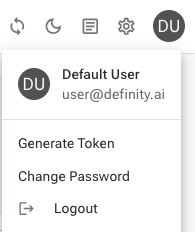
In the Definity app, click your user avatar (top right) and select Generate Token.
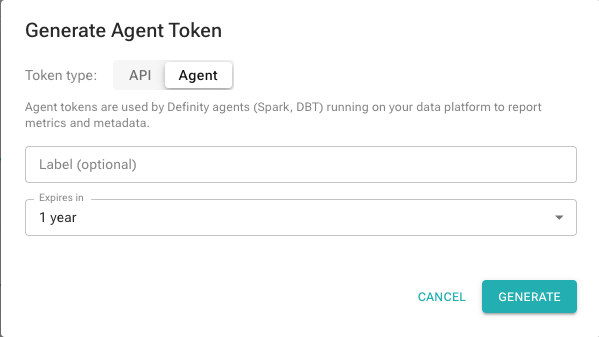
Select the Agent token type, optionally add a label, and click Generate. Copy the token.
Environment Variables
Core
| Name | Value | Note |
|---|---|---|
DEFINITY_SERVER_URL | https://app.definity.run | mandatory |
DEFINITY_TOKEN | your agent token | mandatory for SaaS |
DEFINITY_ENV | e.g. prod, staging | optional |
Pipeline Tracking
| Name | Value | Note |
|---|---|---|
DEFINITY_PIPELINE_NAME | default - dbt project name | optional |
DEFINITY_PIPELINE_PIT | default - current time | logical point in time |
DEFINITY_TASK_NAME | default - dbt project name | optional |
Advanced Configuration
| Name | Value | Note |
|---|---|---|
DEFINITY_LOG_LEVEL | default - info | |
DEFINITY_SERVER_ATTEMPTS | default - 2 | |
DEFINITY_SERVER_ATTEMPT_SLEEP | default - 10 | |
DEFINITY_SERVER_TIMEOUT | default - 5 |
Usage
Replace dbt with definity-dbt. All dbt flags and arguments pass through unchanged.
definity-dbt seed
definity-dbt run
definity-dbt test
Complete Example
export DEFINITY_SERVER_URL=https://app.definity.run
export DEFINITY_TOKEN=your-token
export DEFINITY_ENV=prod

definity-dbt run --project-dir /path/to/project
Airflow Integration
When running from Airflow, DEFINITY_PIPELINE_NAME, DEFINITY_TASK_NAME, and DEFINITY_PIPELINE_PIT are automatically inherited from the Airflow DAG and task context. No additional configuration needed.