Insights & Recommendations
definity analyzes every run of every job and turns what it finds into insights: a specific issue on a specific job, with its impact. definity fixes most cost insights itself with Auto-Tune. The rest come with the exact change your team needs to make.
What definity looks for
Resource optimization
Spark job cost is usually visible in your cloud FinOps tools, but the waste inside it is hard to find and attribute. If your job requested 50 executors with 2 vCores and 32 GB RAM:
- How much of it does the job actually use?
- How much can be saved without harming its SLA, and how?
definity tracks the utilization of each query and job across runs, finds the waste, such as over-provisioned executors or memory, spill, skew and idle time, and works out how to remove it. See Performance Overview for the waste definity detects.
Execution health
definity tracks failures, retries, SLA misses, disk spill, long idle time and skew patterns. Once a pattern is consistent across multiple runs, definity creates an insight for it.
How insights get fixed
Each insight is fixed in one of two ways:
| Fix | What it covers | Who acts |
|---|---|---|
| Auto-tune | Waste that can be fixed through configuration, for example executor count, cores, memory or shuffle partitions | definity, automatically, on production runs. Each change is checked against the job's duration budget, SLA and reliability, and reverted if it regresses. |
| Recommendation | Waste that needs a code or data change, such as a query rewrite, repartitioning in code or a skewed key | Your team, following the suggested action |
With Auto-Tune on, which is a single workspace-wide toggle, definity fixes every auto-tunable insight on its own. You don't need to review or apply anything. See Auto-Tune for how it works and how to track it.
What an insight contains
- Type: Cost or Health, and the specific issue
- Impact: what the issue costs per year, or its SLA impact
- Asset: the table or task analyzed
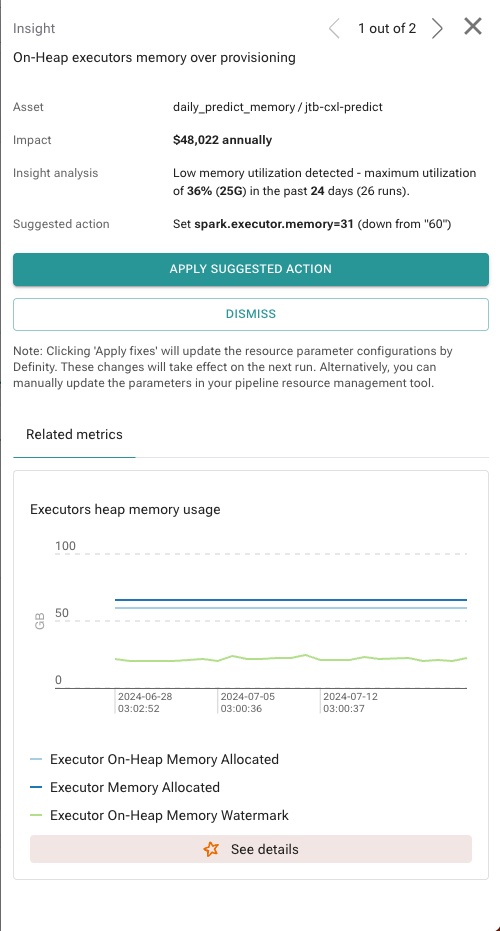
- Content: a detailed description of the issue
- Fix: Auto-tune, or a suggested action for your team
- Status: for auto-tuned insights, whether tuning is open, in progress or closed. See Insight lifecycle
- Proof points: the metrics behind the insight, so you can dig in